IBExpert & Firebird Prepaid Hotline
(German-language version below)
Telephone and/or remote support billed by the minute
Languages spoken: English and German. Including remote support using pcvisit. All questions regarding Firebird, Delphi®, IBExpert and Lazarus are welcome.
We will schedule a support appointment as soon as possible after receiving your support request and validating your credit. Should you require our support, billing will be in accordance with our general conditions, as described here:
| Standard Hotline: Monday - Friday 08:00 -18:00 (CET): Hotline customer account: - 1 minute for each minute used* |
135 €/hour |
| Hotline Express: Monday - Sunday 08:00 - 22:00 (CET): Hotline customer account: - 2 minutes per minute used* |
270 €/hour |
| Hotline Express Emergency: Monday - Sunday after 22:00 (CET): Hotline customer account: - 3 minutes per minute used* |
405 €/hour |
* We recommend setting up a prepaid hotline customer account with a sufficient credit balance (e.g. 960 minutes) so that we can help you quickly and unbureaucratically in an emergency and you save time and money. Your hotline credit does not expire and can be used as required.
Your hotline customer account will be debited with the exact number of minutes used during a remote or telephone session.
You can find our price list here.
And this is how it works: After activating your hotline customer account in the IBExpert Download Center, you can view your prepaid code, your available hotline minutes and a list of your hotline sessions with start and end times under Hotline Information. You will be connected directly to your contact person via your hotline telephone number, which you will receive by e-mail (no call center!). You should quote the prepaid code when you call.
Our IBExpert and Firebird hotline is available worldwide.
You can find a summary of all IBExpert services and fees under All products & prices. If you have any further questions please mail register@ibexpert.net.
IBExpert und Firebird Prepaid Hotline
Support per Telefon und/oder Remote mit minutengenauer Abrechnung
Sprachen: Englisch und Deutsch. Inklusive Remote-Support mit pcvisit. Alle Fragen zu Firebird, Delphi®, IBExpert und Lazarus sind willkommen.
Einen Support-Termin vergeben wir schnellstmöglich nach Eingang Ihrer Supportanfrage und Prüfung Ihres Guthabens. Sollten Sie unsere Unterstützung benötigen, erfolgt die Abrechnung gemäß unserer Rahmenbedingungen, wie hier beschrieben:
| Standard Hotline: Montag - Freitag 8.00 -18.00 Uhr (MEZ): Hotline Kundenkonto: - 1 Minute je verbrauchter Minute* |
135 €/Stunde |
| Hotline Express: Montag - Sonntag 8.00 - 22.00 Uhr (MEZ): Hotline Kundenkonto: - 2 Minuten je verbrauchter Minute* |
270 €/Stunde |
| Hotline Express Emergency: Montag - Sonntag ab 22.00 Uhr (MEZ): Hotline Kundenkonto: - 3 Minuten je verbrauchter Minute* |
405 €/Stunde |
* Wir empfehlen, ein prepaid Hotline-Kundenkonto mit einem ausreichend hohen Guthaben einzurichten (z.B. 960 Minuten), so können wir Ihnen im Notfall schnell und unbürokratisch helfen und Sie sparen Zeit und Geld. Ihr Guthaben verfällt nicht und kann bei Bedarf abgerufen werden.
Ihr Hotline-Kundenkonto wird mit der genauen Anzahl der verbrauchten Minuten einer Remote- oder Telefon Session belastet.
Unsere Preisliste finden Sie hier.
Und so geht's: Nach Freischaltung Ihres Hotline-Kundenkontos im IBExpert Download Center können Sie unter Hotline Information Ihren Prepaid Code, Ihre verfügbaren Hotline-Minuten und die Auflistung Ihrer Hotline-Sessions mit Start- und Endzeit einsehen. Sie werden über Ihre Hotline-Telefonnummer, die Sie per E-Mail erhalten, direkt mit Ihrem Ansprechpartner verbunden (kein Call Center!). Ihren Prepaid Code teilen Sie Ihrem Ansprechpartner bei Ihrem Anruf mit.
Unsere IBExpert und Firebird Hotline steht Ihnen auch in Ländern außerhalb Deutschlands zur Verfügung.
Eine Übersicht aller IBExpert Dienstleistungen und Gebühren finden Sie unter Alle Produkte & Preise. Wenn Sie weitere Fragen haben, senden Sie bitte eine Mail an register@ibexpert.net.
IBEScript – Firebird-Skripte automatisiert ausführen
Mit IBEScript lassen sich Firebird-Skripte komfortabel über die Windows-Kommandozeile automatisiert ausführen. Das eigenständige Kommandozeilen-Tool eignet sich ideal für geplante Aufgaben, Installationsroutinen, Batch-Dateien und CI/CD-Prozesse – ganz ohne grafische Benutzeroberfläche.
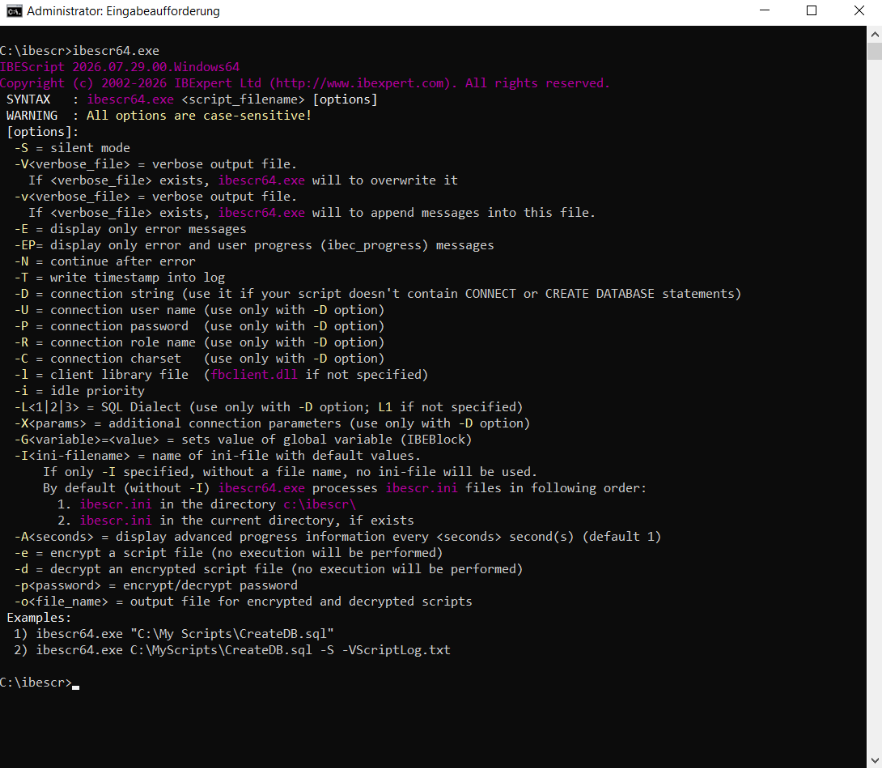
Die Abbildung zeigt die aktuelle Hilfeausgabe der 64-Bit-Windows-Version von IBEScript 2026.07.29.
Bereits der Aufruf von ibescr64.exe zeigt alle verfügbaren Kommandozeilenoptionen, darunter Funktionen für Protokollierung, Fehlerbehandlung, Verbindungen und Skriptverschlüsselung.
Automatisierung von Datenbankprozessen
IBEScript befindet sich im IBExpert-Installationsverzeichnis und kann direkt über die Kommandozeile gestartet werden. Dadurch lassen sich wiederkehrende Aufgaben zuverlässig automatisieren, beispielsweise:
- Erstellung und Einrichtung von Firebird-Datenbanken
- Ausführung von Update- und Wartungsskripten
- Datenmigrationen
- automatisierte Reports und Exporte
- Integration in Installations- und Deployment-Prozesse
Die grundlegende Syntax:
IBEScript script_filename [options]Beispiel:
IBEScript C:\Scripts\CreateDB.sqlUmfangreiche Steuerungsmöglichkeiten
IBEScript bietet zahlreiche Optionen zur Kontrolle der Skriptausführung:
- ausführliche Ablaufprotokolle und Fehlerausgaben
- Speicherung von Logdateien mit Zeitstempel
- Fortschrittsanzeige bei umfangreichen Skripten
- flexible Übergabe von Verbindungsparametern
- Verschlüsselung und Schutz von Skriptdateien
Leistungsfähige IBEBlock-Unterstützung
Durch die integrierte IBEBlock-Technologie können auch komplexe Datenbankoperationen automatisiert durchgeführt werden.
Mögliche Einsatzbereiche:
- Übertragung von Daten zwischen mehreren Firebird- oder InterBase®-Datenbanken
- Zugriff auf externe ODBC-Datenquellen wie Microsoft Access®, Oracle® oder IBM DB2®
- Vergleich und Synchronisation von Datenbankstrukturen über
ibec_CompareMetadata - automatisierte Erstellung von Reports aus dem IBExpert Report Manager
Zusätzlich unterstützt IBEScript den Import und Export von Dateien in Datenbankfeldern, beispielsweise für BLOB-Daten, sowie die Verwendung von Umgebungsvariablen für flexible Installationen.
Warum sich IBEScript lohnt
IBEScript erweitert IBExpert um eine leistungsfähige Kommandozeilen-Schnittstelle für professionelle Datenbankautomatisierung.
Von einfachen SQL-Ausführungen bis hin zu komplexen Migrationen, Datenbankvergleichen und automatisierten Reports bietet IBEScript alle Werkzeuge, um Firebird-Prozesse effizient und zuverlässig zu steuern.
IBEScript ist damit eine ideale Ergänzung für Entwickler, Administratoren und Unternehmen, die wiederkehrende Datenbankaufgaben automatisieren möchten.
Hinweis: IBEScript ist Bestandteil der IBExpert Developer Studio Edition, der IBExpert Server Tools sowie der IBExpert Company Year Editions und steht in dieser Form nicht in der kostenlosen IBExpert Personal Edition zur Verfügung.
The IBExpert Day Edition is currently on special offer with 200 activations (instead of 100) for just EUR 160 (plus sales tax)
(German-language version below)
This version offers full access to all IBExpert IDE features, including the debugger and performance analysis, and is ideal for flexible working environments, training courses or use on client computers.
Key highlights of the promotion
200 activations: Ample capacity for a wide range of deployment scenarios.
Full feature set: Includes all features of the IBExpert IDE.
Flexibility: Ideal for the office, home office, support and training, and particularly for virtual machines.
Risk minimisation: Automatic expiry after 24 hours, ideal for temporary projects on client systems.
The licenses are valid for 12 months and offer an ideal, cost-effective solution for professional database developers.
This offer is valid until Wednesday 20 May 2026.
EU nations can purchase directly at register@ibexpert.net (please provide your valid EU VAT ID and full billing address when ordering).
Online orders can be made at our authorised e-commerce retailer, PayPro Global: https://ibexpert.net/x/i.x?Day200
Take advantage of this time-limited offer to expand your development environment efficiently and cost-effectively.
Die IBExpert Day Edition ist aktuell in einer Sonderaktion mit 200 Aktivierungen (anstatt 100 Aktivierungen) für nur EUR 160 (zzgl. MwSt.) erhältlich.
Diese Version bietet vollen Zugriff auf alle IBExpert IDE-Funktionen, inklusive Debugger und Performanceanalyse, und ist ideal für flexible Arbeitsumgebungen, Schulungen oder den Einsatz auf Kundenrechnern.
Highlights der Aktion
200 Aktivierungen: Ausreichend Kapazität für vielfältige Einsatzszenarien.
Voller Funktionsumfang: Beinhaltet alle Features der IBExpert IDE.
Flexibilität: Perfekt für Office, Homeoffice, Support und Schulungen, insbesondere auch für virtuelle Maschinen.
Risikominimierung: Automatisches Auslaufen nach 24 Stunden, ideal für temporäre Projekte auf Kundensystemen.
Die Aktivierungen gelten für 12 Monate und bieten eine ideale, kostengünstige Lösung für professionelle Datenbankentwickler.
Diese Aktion ist bis Mittwoch, 20. Mai 2026 begrenzt.
Bestellen Sie direkt an register@ibexpert.net (Hinweis für EU-Kunden außerhalb Deutschlands: Bitte geben Sie Ihre gültige USt-IdNr. sowie die vollständige Rechnungsanschrift an.)
Falls Sie lieber online bestellen möchten, können Sie über den folgenden Link bei unserem autorisierten E-Commerce-Händler PayPro Global einkaufen: https://ibexpert.net/x/i.x?Day200
Nutzen Sie dieses zeitlich begrenzte Angebot, um Ihre Entwicklungsumgebung effizient und kostengünstig zu erweitern.
🎄 IBExpert Christmas Special 2026🎄
IBExpert Developer Studio at a Special Christmas Price!
We have a little surprise for you as the year draws to a close!
With this year's IBExpert Christmas Special, we're offering you the opportunity to expand your developer toolkit while saving money.
Our Christmas Offer
Regular Price: EUR 315.00
Christmas Special: EUR 250.00 plus applicable VAT
Save EUR 65.00 per license!
You can purchase as many licenses as you like at the special price whilst this Christmas offer is valid.
Who can benefit from this offer?
Whether you're equipping new developers in your company or expanding your existing IBExpert installation, our Christmas offer is attractive to both new and existing customers.
New Customers: All purchased licenses will be assigned to a single IBExpert User Account. Creating a second User Account for the same company and the same IBExpert product is not permitted.
Existing Customers: Additional licenses can be added to your existing IBExpert User Account, provided the associated Subscription is still valid. Here too, setting up an additional user account for the same company and the same IBExpert product is not permitted.
Your customers can benefit, too!
Don't forget about your own customers! They can also take advantage of our Christmas offer and purchase their own IBExpert Developer Studio licenses.
This allows your customers to use a full IBExpert license on their own hardware – for example, for remote support, maintenance tasks, or independent work with their databases.
That means both you and your customers can benefit from this year's Christmas Special!
Ordering and Payment Terms
Order processing depends on your company's location:
EU Customers with a Valid VAT ID: Direct orders from IBExpert, with payment in advance against a pro forma invoice.
EU Customers without a Valid VAT ID and All Customers Outside the EU: Orders and payments are processed through PayPro Global (PPG).
Promotional Period
December 1 through December 31, 2026
Please note: Full payment must be received no later than December 31, 2026, to qualify for the Christmas offer.
This offer applies exclusively to the purchase of new or additional licenses. Subscription renewals are excluded.
All other IBExpert license and usage terms remain unchanged.
We wish you a wonderful holiday season and thank you for your trust and continued cooperation!
Your IBExpert Team
IBExpert, Firebird, AI and PHP web applications
Our next English-language know-how remote workshop – register now!
How can mobile web applications for database systems be created quickly, securely and without years of app development?
In this workshop, we will demonstrate in a practical way how you can use IBExpert, Firebird, PHP, and AI to create functional web applications for smartphones, tablets, and PCs in no time at all.
From an empty cloud server to Apache, PHP and Firebird, through to the first productive interface and connection to existing systems – regardless of whether these are based on Firebird or not.
Ideal for software providers, developers, and specialist departments that want to implement mobile solutions efficiently – without being tied to app stores and without needing a large specialist team.
Detailed workshop content: IBExpert, Firebird, AI and PHP web applications
Price per person: EUR 899 (net of any statutory VAT/sales tax)
Registration: register@ibexpert.net
Can't make it on this date? We also offer the workshop individually as a company remote workshop.
Wir bieten diesen Workshop auch auf Deutsch vom 27. bis 28. April 2026 in 64546 Mörfelden-Walldorf, Deutschland an: IBExpert, Firebird, KI und PHP-Webapplikationen.
Lazarus training for Delphi programmers
(German-language version below)
This workshop is ideal for Delphi programmers as an introduction to the world of Lazarus as a supplement to your Delphi skills. With over 20 years experience in Delphi programming we have now been implementing for the last 4 years all new projects exclusively with Lazarus, and provides a comprehensive insight into programming with Lazarus.
Target group
Programmers, who …
... already have a number of years experience developing Delphi applications,
... wish to continue to use their existing Delphi VCL and Pascal knowledge,
... take advantage of a similar development environment with an almost identical programmming language,
... want to realize real multi-platform development,
... want to utilize the advantages of an active open source software and community,
... want to choose a future-proof and vendor-independent development environment for the next 10 to 20 years,
... want to save license fees and yet still keep up-to-date.
We will be focusing on the following topics:
1. Introduction to the world of Lazarus
- Selecting the correct version, 32 or 64 Bit, CodeTyphon or standard Lazarus.
- Installation, parallel installation of multiple versions, portable installation.
- The key paths and files of a Lazarus installation.
- Lazarus components: What is included, where you can get more, how does the install work?
- Limitations when converting existing projects and component libraries.
- Differences between LCL and VCL.
- Comparison of Lazarus project files and Delphi projects.
- Handling the Lazarus IDE; customization options.
- Strategies to incorporate large parts of existing Delphi projects.
2. Avoid past mistakes
- Does it always have to be components or there is another way.
- Dynamic creation of controls and administration in separate lists.
- Dynamic form construction.
- Use OwnerDraw techniques to extend common components.
- Implement complex components on a modular basis.
- Constructing your own class libraries.
- Should properties be set in the Object Inspector or in your code?
- Automatically generate source code.
- Assign events at runtime.
- Global exception handling and trace logging.
- Multilingual and UTF8 support.
- A simple calendar application, modeled on the Google calendar.
3. Database techniques
- Complex 3rd party DB access components or, even better, the integrated SQLDB components.
- Interaction of SQLDB with Firebird and other databases.
- Connection, Transaction, Dataset, Query etc.
- Data source and data-aware components: advantages and disadvantages.
- Alternative methods of data storage and display.
- Object class model for data access without DataSource.
- Generate and use automated SQL for insert/update/delete/select.
- Reporting techniques with Lazarus and databases, report design, interaction with stored procedures.
- Multilingual and UTF8 support in the database.
- Concepts for high-performance database applications.
- A simple database application, illustrating a simple invoicing software.
4. Multi-platform in practice
- Installing Lazarus on other platforms.
- What needs to be considered in order to use the source code on all platforms?
- The major platform-specific basics.
- Open the Lazarus sample project on Win32, Win64, Linux, Mac OSX, Raspberry Pi in the IDE, compile and test.
- Simple Android applications using Lazarus.
- Simple iOS Applications using Lazarus.
- Simple web applications using Lazarus or directly using PHP and Firebird.
5. What's next
- Classic menu structures in the age of tablets and alternatives.
- Touch applications for retail, services and industry.
- Integration of PDF technologies and external applications.
- Advantages of a database-driven architecture.
- Automatic distribution of exe, dll and setup files.
- Automatic distribution of database structures and table contents.
- Concepts for long term, team-friendly code.
- Flexible database models, flexible foreign key and tree structures.

Lazarus Schulung für Delphi Programmierer
Dieser Workshop ist ideal für Delphi-Programmierer als Einstieg in die Welt von Lazarus als Ergänzung zu Ihren Delphi-Kenntnissen. Mit über 20 Jahren Erfahrung in der Delphi-Programmierung setzen wir nun seit 4 Jahren alle neuen Projekte ausschließlich mit Lazarus um und bieten einen umfassenden Einblick in die Programmierung mit Lazarus.
Zielgruppe
Programmierer, die …
... bereits mehrjährige Erfahrung mit der Entwicklung von Delphi Applikationen haben
... ihr vorhandenes Delphi VCL und Object Pascal Know-How weiter nutzen möchten,
... die Vorteile einer ähnlichen Entwicklungsumgebung mit nahezu identischer Programmiersprache nutzen wollen
... eine echte Multiplattformentwicklung realisieren wollen
... die Vorteile einer aktiven Open Source Software und Community nutzen wollen
... eine zukunftssichere und herstellerunabhängige Entwicklungsumgebung für die nächsten 10 bis 20 Jahre auswählen wollen
... Lizenzkosten sparen wollen und trotzdem immer up-to-date bleiben wollen.
Schwerpunkte sind dabei folgende Themen:
1. Einstieg in die Lazarus Welt
- Auswahl der richtigen Version, 32 oder 64 Bit, CodeTyphon oder Standard Lazarus.
- Installation, parallele Installation mehrerer Versionen, portable Installation.
- Die wichtigsten Pfade und Dateien einer Lazarus Installation.
- Lazarus Komponenten: Was ist dabei, wo bekommt man weitere, wie funktioniert das Installieren?
- Grenzen der Konvertierung vorhandener Projekte und Komponenten-Bibliotheken.
- Unterschied LCL und VCL.
- Lazarus Projekt Dateien im Vergleich zu Delphi Projekten.
- Umgang mit der Lazarus IDE, Anpassungsmöglichkeiten.
- Strategien, um große Teile vorhandener Delphi Projekte übernehmen zu können.
2. Fehler der Vergangenheit vermeiden
- Müssen es immer Komponenten sein oder geht es auch anders.
- Dynamisches Erzeugen von Controls und Verwalten in eigenen Listen.
- Dynamischer Maskenaufbau.
- Erweiterungen bekannter Komponenten mit OwnerDraw Techniken.
- Komplexe Komponenten im Baukastenprinzip realisieren.
- Aufbau eigener Klassenbibliotheken.
- Eigenschaften im Objektinspektor setzen oder im Code?
- Quellcode automatisch generieren.
- Events zur Laufzeit zuweisen.
- Globales Exception Handling und Ablaufprotokollierung.
- Mehrsprachigkeit und UTF8 Unterstützung.
- Eine einfache Kalenderanwendung, Vorbild der Google Kalender.
3. Datenbanktechniken
- Komplexe 3rd Party DB Zugriffskomponenten oder doch besser die eingebauten SQLDB Komponenten.
- Zusammenspiel SQLDB mit Firebird und anderen Datenbanken.
- Connection, Transaction, Dataset, Query etc.
- Datasource und datensensitive Komponenten Vorteile und Nachteile.
- Alternative Wege der Datenspeicherung und -anzeige.
- Objektklassenmodell für Datenzugriffe ohne Datasource.
- Automatisiert SQL für insert/update/delete/select erzeugen und nutzen.
- Reporttechniken mit Lazarus und Datenbanken, Reportdesign, Zusammenspiel mit Stored Procedures.
- Mehrsprachigkeit und UTF8 Unterstützung in der Datenbank.
- Konzepte für performante Datenbankanwendungen.
- Eine einfache Datenbankanwendung, Vorbild eine einfache Faktura Software.
4. Multiplattform in der Praxis
- Lazarus auf anderen Plattformen installieren.
- Was sollte man beachten, um den Quellcode auch auf allen Plattformen nutzen zu können?
- Die wichtigsten plattformspezifischen Grundlagen.
- Lazarus Beispielprojekt auf Win32, Win64, Linux, Mac OSX, Raspberry Pi in der IDE öffnen, kompilieren und testen.
- Einfache Android Anwendungen mit Lazarus.
- Einfache iOS Anwendungen mit Lazarus.
- Einfache Webanwendungen mit Lazarus oder direkt mit PHP und Firebird.
5. Wie geht es weiter
- Klassische Menüstrukturen im Zeitalter der Tablets und Alternativen.
- Touch Anwendungen für Einzelhandel, Dienstleistungen und Industrie.
- Integration von PDF Technologien und Fremdanwendungen.
- Vorteile einer database-driven Architecture.
- Exe, DLL und Setup Dateien automatisiert verteilen.
- Datenbankstrukturen und Tabelleninhalte automatisiert verteilen.
- Konzepte für langfristig und im Team nutzbaren Code.
- Flexible Datenbankmodelle, flexible Fremdschlüssel und Baumstrukturen.